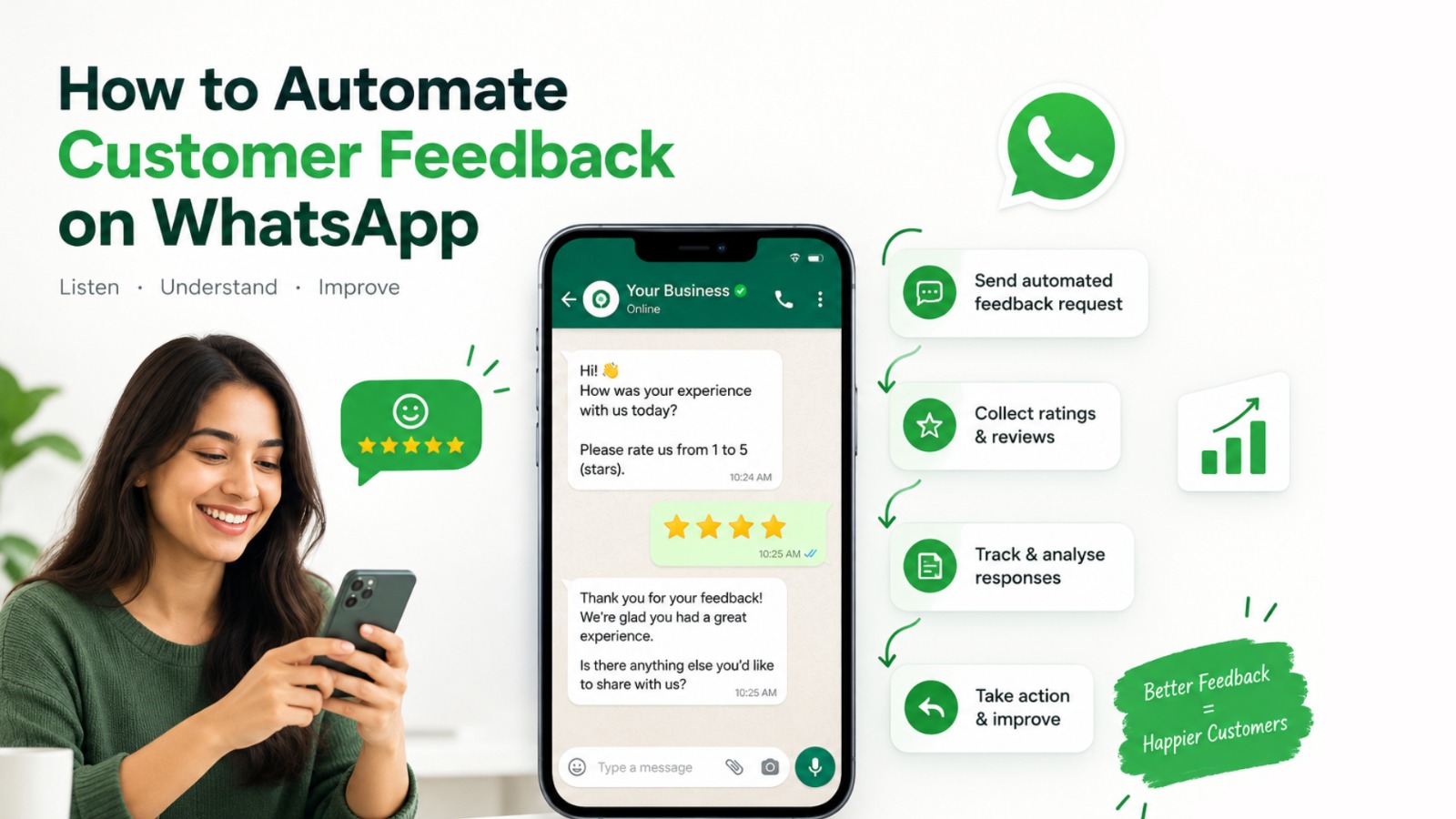
How to Automate Customer Feedback on WhatsApp
Customer feedback is one of the most valuable sources of information for any business. It tells you what customers like, where they face problems, and what your business can improve.
However, collecting feedback manually is not always easy. Your team may need to send messages, make calls, follow up with customers, record responses, and analyze the information.
As your customer base grows, this process becomes even more difficult.
That is where WhatsApp customer feedback automation can help.
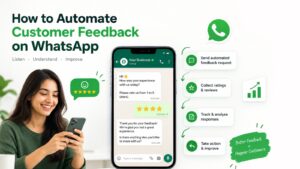
With WhatsApp Business API, businesses can automatically send feedback requests, collect ratings, ask follow-up questions, identify unhappy customers, and route important conversations to support teams.
As a result, businesses can collect useful feedback without depending completely on manual follow-ups.
At Trending Bulb, digital marketing and content strategies help businesses improve their online visibility and customer engagement. Similarly, Step4Growth focuses on digital growth opportunities that connect marketing, technology, and customer acquisition.
Meanwhile, Campaign Plus provides WhatsApp automation, chatbot and more to make business growth.
Together, these solutions can help businesses create a more connected customer journey.
What Is Customer Feedback Automation on WhatsApp?
Customer feedback automation on WhatsApp means using automated workflows to request, collect, organize, and respond to customer feedback through WhatsApp.
Instead of asking employees to contact customers individually, businesses can create predefined WhatsApp workflows.
For example, imagine that a customer purchases a product from your online store.
After the product is delivered, an automated WhatsApp message can be sent.
The message could say:
“Hi Rahul! We hope you enjoyed your purchase. How would you rate your experience from 1 to 5?”
The customer can then provide a rating.
Next, the automation can respond according to that rating.
A happy customer could receive a thank-you message. On the other hand, a customer who gives a low rating could be asked to explain the problem.
Therefore, feedback becomes a natural part of the customer journey instead of a separate manual task.
Why Automate Customer Feedback on WhatsApp?
Businesses already communicate with customers through WhatsApp for sales, support, updates, and follow-ups.
Therefore, using the same channel for customer feedback can make the process more convenient.
Moreover, automation adds speed and consistency.
Here are some of the main benefits.
1. Collect Customer Feedback Faster
Manual feedback collection takes time.
First, employees need to identify customers. Then, they need to send messages, wait for replies, record responses, and follow up.
WhatsApp automation can simplify this process.
For example, a feedback request can automatically trigger after:
- A product purchase
- Order delivery
- Customer support interaction
- Appointment completion
- Service completion
- Demo
- Consultation
- Course completion
- Hotel checkout
- Vehicle servicing
Consequently, your team can spend less time on repetitive communication.
2. Improve Feedback Response Rates
Customers are more likely to respond when feedback is easy.
A long survey can create friction. In contrast, a short WhatsApp message can make the process simpler.
For instance:
“How would you rate your experience?”
The customer can simply select a rating.
Afterward, the automation can ask one additional question if more information is required.
Therefore, businesses can collect meaningful feedback without overwhelming customers.
3. Get Feedback at the Right Time
Timing plays an important role in customer feedback.
If a business waits several weeks before asking about an experience, customers may not remember important details.
Instead, businesses can trigger WhatsApp feedback shortly after a relevant event.
For example:
Delivery completed → Feedback request
Appointment completed → Experience survey
Support ticket closed → Service feedback
Vehicle serviced → Customer satisfaction request
As a result, businesses can collect feedback while the experience is still fresh.
4. Reduce Manual Follow-Ups
Manual follow-ups can easily become inconsistent.
One employee may contact customers regularly, while another may forget.
With automation, businesses can create predefined workflows.
Consequently, the feedback process can remain consistent even when the number of customers increases.
5. Identify Customer Problems Earlier
Customer feedback can reveal problems that internal teams may not notice.
For example, customers might repeatedly complain about:
- Delivery delays
- Product quality
- Slow customer support
- Difficult checkout
- Poor communication
- Appointment delays
- Packaging
- Pricing
- Technical problems
By monitoring these responses, businesses can identify recurring issues earlier.
Therefore, WhatsApp feedback automation can support continuous customer experience improvement.
How Does WhatsApp Customer Feedback Automation Work?
A successful automated feedback workflow does not need to be complicated.
Usually, it follows a simple sequence.
Step 1: Define the Feedback Trigger
First, decide when you want to request feedback.
The trigger should match the customer’s journey.
For example, an e-commerce company could trigger feedback after delivery.
Similarly, a restaurant could send feedback after an order.
A healthcare business could request feedback after an appointment.
An automobile company could ask for feedback after vehicle servicing.
Therefore, start by identifying the customer action that should trigger the feedback message.
Step 2: Send an Automated WhatsApp Feedback Message
Next, create a short and clear message.
Avoid unnecessary information.
For example:
“Hi {{name}}, how was your recent experience with us? Please rate your experience from 1 to 5.”
A simple message makes the customer’s next action clear.
Additionally, supported WhatsApp interactive features can make responding easier.
Step 3: Collect the Customer’s Response
Once the customer responds, the system can capture the answer.
For example:
5 — Excellent
4 — Good
3 — Average
2 — Poor
1 — Very Poor
The workflow can then move the customer into the appropriate next step.
Step 4: Ask a Follow-Up Question
A rating provides useful information. However, it does not always explain the reason behind the rating.
Therefore, businesses can ask a short follow-up question.
For a positive response:
“What did you like most about your experience?”
For a negative response:
“We’re sorry your experience did not meet expectations. What could we improve?”
This approach can provide both numerical and written feedback.
Step 5: Route Important Issues to a Human
Automation should not replace human support when a customer needs personal assistance.
For example, if a customer gives a rating of 1 or 2, the workflow can notify the support team.
The conversation can then be transferred to a human representative.
A practical workflow could be:
Low rating → Ask for details → Create support task → Notify team → Human follow-up
As a result, automation helps the team identify important conversations instead of allowing them to get lost.
Step 6: Analyze the Feedback
Finally, businesses need to turn feedback into insights.
Look for recurring patterns.
For example:
- Which products receive the highest ratings?
- Which services generate complaints?
- What problems appear repeatedly?
- Which locations receive lower ratings?
- What do customers praise most often?
- Which support issues need improvement?
Therefore, collecting feedback is only the first step.
The real value comes from using the information to make better business decisions.
How to Create an Automated Feedback Workflow on WhatsApp
A simple WhatsApp feedback automation workflow can look like this:
Customer completes purchase
↓
Order is delivered
↓
Automated WhatsApp feedback request
↓
Customer gives rating
↓
If rating is positive:
Thank customer
↓
Ask for review or testimonial
If rating is negative:
Ask what went wrong
↓
Create support follow-up
↓
Resolve the issue
↓
Request feedback again
This creates a feedback loop instead of a one-time survey.
Moreover, the process can help businesses connect customer feedback with customer support and retention.
What Questions Should You Ask for WhatsApp Customer Feedback?
The quality of your feedback depends on the questions you ask.
Therefore, keep questions simple and relevant.
Customer Satisfaction Question
“How satisfied are you with your experience?”
Rating Question
“How would you rate our service from 1 to 5?”
Product Feedback Question
“How satisfied are you with the product you purchased?”
Customer Support Question
“Was your issue resolved successfully?”
Open-Ended Question
“What could we improve?”
Recommendation Question
“How likely are you to recommend us to someone else?”
However, avoid asking too many questions in one conversation.
A short and focused feedback journey is usually easier for customers to complete.
Use WhatsApp Chatbots to Automate Customer Feedback
A WhatsApp chatbot can make customer feedback more conversational.
Instead of sending one survey link, businesses can create a guided conversation.
For example:
Bot: Hi Priya! How was your recent experience with us?
Customer: Great!
Bot: That’s wonderful! How would you rate your experience?
Customer: 5
Bot: Thank you! What did you like most?
Customer: Fast delivery.
Bot: We’re glad to hear that. Thank you for sharing your feedback!
This conversational approach can make feedback collection feel more natural.
Furthermore, chatbots can guide customers through different paths based on their answers.
For example, satisfied customers can follow one journey, while customers reporting problems can follow another.
As a result, businesses can create more personalized customer experiences.
Connect WhatsApp Feedback With Your CRM
Customer feedback becomes even more useful when it connects with your CRM.
For example, suppose a customer gives a low rating.
The workflow can update the customer’s CRM profile.
It can also create a follow-up task for the customer support team.
Similarly, a highly satisfied customer can be placed into a segment for future review, referral, or retention campaigns.
Therefore, the customer journey can become:
Purchase → WhatsApp Feedback → CRM Update → Segmentation → Follow-Up → Retention
This approach can reduce disconnected data and improve coordination between teams.
At Step4Growth, businesses can explore how digital marketing, customer acquisition, automation, and CRM processes can work together.
Meanwhile, Campaign Plus can support WhatsApp-focused communication and automation workflows.
How Different Industries Can Use WhatsApp Feedback Automation
WhatsApp customer feedback automation can work across multiple industries.
E-Commerce Businesses
Online stores can request feedback after delivery.
They can ask customers about:
- Product quality
- Delivery experience
- Packaging
- Shopping experience
- Customer support
Additionally, positive feedback can help businesses identify customers who may be suitable for testimonials or referrals.
Restaurants
Restaurants can collect feedback after dine-in, takeaway, or delivery orders.
For example, they can ask about:
- Food quality
- Delivery speed
- Packaging
- Staff service
- Overall experience
Because feedback can arrive soon after the order, restaurants can identify issues faster.
Healthcare Businesses
Clinics and healthcare businesses can request feedback after appointments.
They can ask about:
- Appointment experience
- Staff communication
- Waiting time
- Service experience
- Overall satisfaction
The workflow should remain respectful and appropriate for the healthcare context.
Education Businesses
Coaching institutes and education companies can collect feedback after:
- Classes
- Courses
- Workshops
- Counseling sessions
- Training programs
This information can help educational businesses improve their learning experience.
Real Estate Businesses
Real estate companies can request feedback after property visits.
For instance, they can ask whether the property matched expectations or whether the sales representative provided useful information.
Automobile Businesses
Dealerships and service centers can request feedback after:
- Vehicle servicing
- Test drives
- Vehicle delivery
- Repairs
- Customer support
This can help identify service issues and improve customer relationships.
SaaS Companies
SaaS businesses can automate feedback after:
- Product onboarding
- Trial completion
- Customer support
- Feature launches
- Account setup
As a result, product and customer-success teams can identify recurring customer concerns.
Automate Positive and Negative Feedback Separately
Not every customer needs the same follow-up.
Therefore, create response-based workflows.
Positive Feedback Workflow
Suppose a customer gives a rating of 5.
The system can respond:
“Thank you for your feedback! We’re happy to know you had a great experience. Would you like to share your experience with others?”
Depending on the business and platform setup, the next step could encourage a review, testimonial, or referral.
Negative Feedback Workflow
Now imagine a customer gives a rating of 2.
Instead of immediately sending promotional content, the system can respond:
“We’re sorry your experience did not meet expectations. Could you tell us what went wrong?”
The response can then be routed to the appropriate team.
Therefore, businesses can use automation for both feedback collection and service recovery.
How WhatsApp Feedback Automation Improves Customer Experience
Customer experience is not simply about answering questions.
It is also about listening.
When a business asks customers for feedback and actually acts on their responses, customers can see that their opinions matter.
For example, a business may discover that customers frequently complain about delivery delays.
The company can investigate the delivery process.
Similarly, repeated complaints about customer support may indicate the need for additional training or better processes.
Therefore, automated feedback can become an early-warning system for customer experience problems.
Common Mistakes When Automating Customer Feedback on WhatsApp
Automation can save time. However, poor automation can create a frustrating experience.
Avoid these common mistakes.
1. Sending Too Many Messages
Do not send repeated feedback requests without a clear reason.
Instead, establish sensible frequency rules.
2. Writing Long Messages
Customers should understand the purpose immediately.
Therefore, keep the first message short.
3. Asking Too Many Questions
A long survey can discourage responses.
Start with one important rating question and add follow-ups only when necessary.
4. Ignoring Negative Feedback
Collecting negative feedback without taking action can damage trust.
Instead, create a process for escalation and resolution.
5. Sending Generic Messages
Personalization can make communication more relevant.
Where appropriate, use the customer’s name, order details, service type, or other useful context.
6. Removing Human Support
Automation should make communication easier.
However, customers should still have a clear path to human assistance when required.
WhatsApp API vs Manual Customer Feedback
Manual feedback collection can work when a business has a small customer base.
However, the process becomes harder to manage as customer volume increases.
| Factor | Manual Feedback | WhatsApp Automation |
|---|---|---|
| Message sending | Manual | Automated |
| Follow-ups | Manual | Workflow-based |
| Response collection | Manual | Automated |
| Customer segmentation | Limited | More structured |
| Speed | Slower | Faster |
| Scalability | Limited | Higher |
| CRM updates | Often manual | Can be integrated |
| Reporting | Often spreadsheet-based | Can be organized automatically |
| Human support | Required frequently | Used for important cases |
The right approach depends on your business size, customer volume, technology, and workflow.
Nevertheless, WhatsApp automation becomes increasingly useful when repetitive communication starts taking significant team time.
How Campaign Plus Can Help With WhatsApp Automation
Businesses searching for a WhatsApp automation platform can explore solutions such as Campaign Plus.
Campaign Plus provides WhatsApp automation, chatbot and more to make business growth.
For example, businesses can build structured communication workflows around customer actions.
A typical journey could include:
Customer Action → Automated WhatsApp Message → Customer Response → Chatbot Follow-Up → Team Notification
Moreover, WhatsApp automation can support different customer journeys for sales, support, feedback, and follow-ups.
For businesses comparing WhatsApp API providers, it is important to evaluate factors such as:
- Automation capabilities
- Chatbot functionality
- CRM integration
- Message management
- Analytics
- Scalability
- Support
- Workflow flexibility
Therefore, businesses should select a solution based on their actual communication requirements.
How Trending Bulb and Step4Growth Fit Into a Digital Growth Strategy
WhatsApp automation works best when it connects with a broader digital marketing strategy.
At Trending Bulb, businesses can focus on content, digital marketing, social media, and online visibility.
At the same time, Step4Growth can help businesses explore digital growth strategies involving marketing, customer acquisition, and technology.
For example, a business can use social media content to create awareness.
Next, Meta Ads can generate website visitors or leads.
Then, WhatsApp can help the business communicate with those prospects.
After conversion, automated WhatsApp feedback can measure customer satisfaction.
Finally, businesses can use those insights to improve products, services, and future campaigns.
Therefore, the complete journey can look like:
Awareness → Lead Generation → WhatsApp Conversation → Conversion → Customer Experience → Feedback → Improvement → Retention
This connected approach can help businesses think beyond individual marketing channels.
Best Practices for Automating Customer Feedback on WhatsApp
To create a better feedback system, follow these practical guidelines.
1. Choose the right trigger
Send feedback after a meaningful customer interaction.
2. Keep the first message short
Explain the purpose and make the next action clear.
3. Ask relevant questions
Do not collect information simply because the automation allows it.
4. Personalize the experience
Use relevant customer information where appropriate.
5. Make responses simple
Ratings, buttons, and short questions can reduce friction when supported by your WhatsApp setup.
6. Create response-based workflows
Different customer responses should lead to relevant next steps.
7. Escalate serious issues
Give customers access to human support when necessary.
8. Connect feedback with your CRM
This can help teams organize customer information and follow-up actions.
9. Analyze patterns
Look for recurring complaints and common positive experiences.
10. Take action
Most importantly, use customer feedback to improve the business.
Real-World Example of WhatsApp Feedback Automation
Consider an online fashion business.
A customer purchases a dress from the website.
After delivery, an automated WhatsApp message is sent:
“Hi Priya! We hope you loved your purchase. How would you rate your shopping experience from 1 to 5?”
Priya selects 5.
The workflow then sends:
“Thank you! What did you like most about your experience?”
She responds:
“Fast delivery and excellent packaging.”
The business records this feedback.
Now consider another customer who selects 2.
The system responds:
“We’re sorry your experience wasn’t ideal. Could you tell us what we could improve?”
The customer says:
“My order arrived late.”
The system can then notify the support team.
A team member follows up with the customer and works toward resolving the issue.
Afterward, the business can request feedback again.
As a result, automation creates a complete feedback loop:
Collect → Understand → Resolve → Improve → Reconnect
How to Measure WhatsApp Feedback Automation
Automation should also be measurable.
Businesses can track metrics such as:
Feedback Request Delivery Rate
How many feedback requests successfully reached customers?
Response Rate
How many customers responded?
Average Rating
What is the average customer rating?
Negative Feedback Rate
How many customers reported problems?
Resolution Rate
How many reported issues were successfully handled?
Response Time
How quickly does the team respond to negative feedback?
Repeat Feedback
Do customers provide better ratings after an issue is resolved?
These metrics can help businesses understand whether their feedback process is working effectively.
The Future of Customer Feedback Is Conversational
Customer feedback is moving beyond traditional forms and lengthy surveys.
Instead, businesses are increasingly looking for convenient, conversational ways to communicate.
WhatsApp can support this approach because customers can interact with businesses through a familiar messaging environment.
With WhatsApp Business API, automation, chatbots, CRM integration, and structured workflows, businesses can create feedback journeys that are faster and more connected.
However, technology alone does not create great customer experiences.
Businesses still need to ask useful questions.
They also need to listen carefully.
Most importantly, they need to act on what customers say.
That is where automated feedback becomes a valuable part of a larger customer experience strategy.
Final Thoughts
Learning how to automate customer feedback on WhatsApp can help businesses create faster, more consistent, and more organized customer communication.
Instead of relying entirely on manual calls, emails, and spreadsheets, businesses can create automated feedback workflows based on customer actions.
The process can be simple:
Trigger → WhatsApp Feedback Request → Customer Response → Follow-Up → Analysis → Action
Furthermore, businesses can connect WhatsApp feedback with chatbots, CRM systems, customer support, sales workflows, and digital marketing campaigns.
Campaign Plus can support WhatsApp automation and chatbot-based communication, while Trending Bulb and Step4Growth can support broader digital marketing and growth strategies.
Ultimately, customer feedback should not be treated as just another survey.
It should become a continuous feedback loop.
When businesses listen to customers, understand their concerns, resolve problems, and improve their services, feedback becomes a powerful tool for customer experience and long-term growth.
Collect feedback. Understand customers. Take action. Keep improving.
Frequently Asked Questions About WhatsApp Customer Feedback Automation
1. What is WhatsApp customer feedback automation?
WhatsApp customer feedback automation uses automated workflows to send feedback requests, collect responses, ask follow-up questions, and route important conversations through WhatsApp.
2. Can businesses automatically ask for feedback after a purchase?
Yes. Businesses can create workflows that trigger feedback messages after events such as purchases, deliveries, appointments, or completed services.
3. Can WhatsApp chatbots collect customer feedback?
Yes. WhatsApp chatbots can guide customers through rating questions, follow-ups, and other predefined feedback conversations.
4. Can WhatsApp feedback connect with a CRM?
Depending on the platform and integration setup, WhatsApp workflows can connect with CRM systems. This can help businesses update customer records and create follow-up tasks.
5. How should businesses handle negative WhatsApp feedback?
Businesses can create a separate workflow for low ratings. The system can ask for additional details and then route the conversation to a human support representative.
6. Is WhatsApp feedback automation useful for small businesses?
Yes. Small businesses can use automation to reduce repetitive communication and create a consistent feedback process. However, the workflow should match their customer volume and business requirements.
7. Why is automated customer feedback important?
Automated feedback can help businesses collect customer opinions faster, identify recurring problems, and understand customer satisfaction at scale.
8. What is Campaign Plus?
Campaign Plus provides WhatsApp automation, chatbot and more to make business growth. Businesses can explore WhatsApp-based workflows for customer communication, automation, and engagement.