Introduction
WhatsApp has become an important communication channel for businesses that want to connect with customers quickly. From order updates and appointment reminders to promotional campaigns and customer support, companies now use WhatsApp throughout the customer journey.
However, businesses using the WhatsApp Business API cannot send every type of message whenever they want. For many business-initiated conversations, they need approved WhatsApp API templates.
These templates provide a structured way to communicate with customers. At the same time, they help businesses create consistent and organized communication workflows.
For example, an online store can use a WhatsApp template to confirm an order. Similarly, a healthcare provider can send an appointment reminder, while a financial service can send a payment notification.
Therefore, understanding WhatsApp API templates is important for businesses that want to use WhatsApp automation effectively.
In this guide, we will explain what WhatsApp API templates are, explore their major types, discuss the best practices businesses should follow, and highlight common mistakes to avoid.
Moreover, we will explain how businesses can connect templates with automation and customer journeys. We will also look at how Campaign Plus, Step4Growth, and Trending Bulb can fit into a broader digital communication strategy.
What Are WhatsApp API Templates?
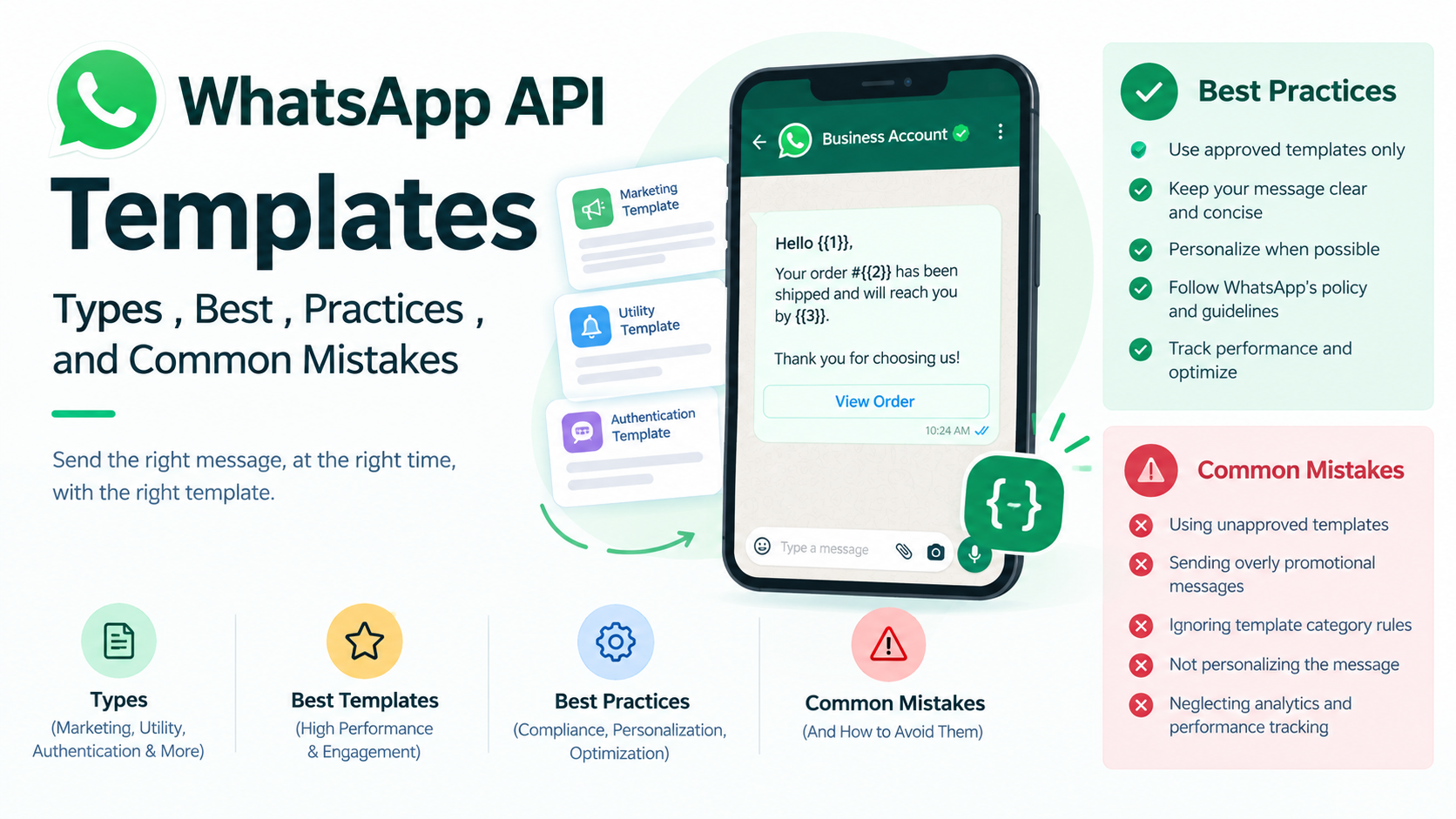
WhatsApp API templates are pre-approved message formats that businesses can use for specific types of business communication through the WhatsApp Business Platform.
Unlike a normal WhatsApp conversation, API-based business communication follows specific rules. Consequently, businesses need structured templates for many business-initiated messages.
A template can include different components, such as:
- Text
- Images
- Videos
- Documents
- Buttons
- Call-to-action elements
- Dynamic variables
- Customer-specific information
For instance, a business can create a message such as:
Hello {{1}}, your order {{2}} has been confirmed and will be delivered by {{3}}.
Here, the variables can change automatically according to customer information.
As a result, businesses can personalize communication without manually creating a separate message for every customer.
Why Are WhatsApp API Templates Important?
Businesses often manage hundreds or even thousands of customer interactions. Therefore, manually writing every update can consume significant time and resources.
WhatsApp API templates help solve this problem by providing reusable communication formats.
1. They Save Time
Once an appropriate template is approved and connected to an automation workflow, businesses can use it whenever the relevant event occurs.
For example, an e-commerce store can automatically send an order confirmation after a customer completes a purchase.
Consequently, employees do not need to send every confirmation manually.
2. They Improve Consistency
A standardized template helps businesses maintain a consistent communication style.
For example, every order confirmation can follow the same structure while customer-specific information changes automatically.
As a result, customers receive clearer and more predictable communication.
3. They Support Automation
WhatsApp API templates can work with CRM systems, chatbots, e-commerce platforms and other business tools.
For instance, placing an order can automatically trigger a confirmation message.
Similarly, a payment due date can trigger a reminder without requiring manual intervention.
4. They Improve Customer Communication
Customers usually want quick information about orders, appointments, payments and service requests.
Therefore, timely WhatsApp messages can make the customer experience more convenient.
Instead of waiting for a phone call or email, customers can receive useful updates directly through WhatsApp.
5. They Support Scalable Communication
As a business grows, customer communication also increases.
However, companies do not always need to increase manual work at the same rate.
With suitable automation, repetitive communication can be handled automatically. Meanwhile, employees can focus on conversations that require human attention.
Types of WhatsApp API Templates
WhatsApp API templates can support different business communication requirements. However, the message category should always match the actual purpose of the communication.
Below are some of the most common use cases.
1. Utility Templates
Utility templates are generally used for transactional or service-related communication.
These messages provide information connected to an existing customer interaction.
For example, businesses can use utility messages for:
- Order confirmations
- Shipping updates
- Delivery notifications
- Appointment reminders
- Booking confirmations
- Payment reminders
- Account updates
- Service notifications
A simple example could be:
Hi {{1}}, your order {{2}} has been shipped. You can track your delivery using the button below.
Here, the purpose is to provide an important order update.
Therefore, the message should remain focused on that particular update instead of adding unnecessary promotional information.
2. Marketing Templates
Marketing templates support promotional and engagement-focused communication.
Businesses can use them to announce offers, product launches, events, recommendations and other marketing activities.
Common examples include:
- Festival offers
- Discount campaigns
- New product launches
- New arrivals
- Special promotions
- Event invitations
- Customer re-engagement
- Product recommendations
For example:
Hi {{1}}, our festive sale is now live. Explore selected products and discover special offers for a limited time.
However, businesses should avoid sending irrelevant promotions.
Instead, audience segmentation can help brands deliver more relevant communication to customers.
As a result, businesses can build more meaningful conversations rather than simply increasing message volume.
3. Authentication Templates
Authentication templates are designed for customer verification.
Businesses can use them when customers need to verify their identity or complete an authentication process.
Common examples include:
- OTP messages
- Login verification
- Account verification
- Access verification
For example:
Your verification code is {{1}}. Please use this code to complete your verification.
Since customers often need authentication information immediately, the message should remain simple and direct.
Moreover, unnecessary promotional content should not distract customers from the verification process.
WhatsApp API Template Components
Creating a WhatsApp API template involves more than writing the main message.
Depending on the template format, businesses can use different components to make communication clearer and more actionable.
Header
The header appears at the beginning of the message.
It can provide a short title or, where supported, use media such as an image, video or document.
For example:
Your Order Update
A clear header immediately tells customers what the message is about.
Body
The body contains the main information.
Therefore, businesses should use this section to communicate the most important details clearly.
For example:
Hi {{1}}, your order {{2}} has been successfully confirmed. We will notify you when it is shipped.
Short sentences usually make the information easier to scan.
Footer
The footer can provide supporting information.
For example:
Thank you for choosing us.
Although optional, a short footer can help reinforce the brand experience.
Buttons
Buttons can make messages more actionable.
Depending on the template and available options, businesses may use actions such as:
- Track Order
- View Product
- Book Appointment
- Contact Support
- Visit Website
Instead of asking customers to type their next action, a clear button can guide them directly.
Consequently, buttons can simplify the customer journey.
Best Practices for WhatsApp API Templates
Creating a template is only the beginning. Businesses also need to make sure that every message is useful, relevant and easy to understand.
The following practices can help businesses create better WhatsApp communication.
1. Keep the Message Clear and Concise
Customers often scan business messages quickly.
Therefore, businesses should avoid unnecessary explanations and lengthy paragraphs.
Instead, communicate the most important information first.
For example:
Your appointment is confirmed for {{1}} at {{2}}.
This is much easier to understand than a long paragraph containing unnecessary details.
As a result, customers can identify the important information immediately.
2. Use Personalization Carefully
Personalization can make automated communication more relevant.
For example:
Hi {{1}}, your order {{2}} is ready for delivery.
Here, the customer’s name and order number can be inserted automatically.
However, businesses should not add variables simply to make a message appear personalized.
Instead, every variable should provide useful information.
Consequently, the message remains natural and easy to understand.
3. Add a Clear Call to Action
When a customer needs to take action, the next step should be obvious.
For example, a business might use:
- Track Order
- Book Appointment
- Complete Payment
- Talk to Support
- View Offer
- Visit Website
A specific CTA provides better direction than a vague option such as Click Here.
Therefore, businesses should make the CTA match the exact action they want customers to take.
4. Match the Template With Its Purpose
The content of a template should accurately reflect its purpose.
For example, a delivery notification should primarily provide delivery information.
Similarly, a payment reminder should clearly communicate the payment-related details.
Adding unrelated promotions to every transactional message can reduce clarity.
Instead, businesses should create separate templates for different communication goals.
As a result, customers receive more relevant information.
5. Use Simple Language
Complex language can make automated communication feel unnecessarily formal.
Therefore, businesses should use simple words and short sentences.
For example:
Your payment is due tomorrow.
is clearer than:
This communication serves as a reminder regarding your upcoming payment obligation.
Simple language makes messages easier to understand.
Moreover, it helps automated communication feel more natural.
6. Maintain Your Brand Voice
Automation does not mean every message should sound robotic.
Instead, businesses should maintain a consistent brand voice across their WhatsApp communication.
For example, a premium fashion brand may use an elegant tone. Meanwhile, a restaurant may prefer a friendly and conversational style.
Therefore, businesses should define their communication style before creating multiple templates.
7. Use Templates Strategically
Not every customer interaction needs automation.
For example, an order confirmation can usually follow a predefined workflow.
On the other hand, a customer complaining about a damaged product may need human assistance.
Therefore, businesses should combine automation with human support.
This approach allows automation to handle repetitive communication while employees manage complex conversations.
Common WhatsApp API Template Mistakes
Even when businesses understand how templates work, certain mistakes can reduce their effectiveness.
More importantly, poor template design can create an inconsistent customer experience.
Here are some common mistakes businesses should avoid.
1. Making Every Message Too Promotional
A common mistake is adding sales language to every communication.
For example, an order confirmation does not always need multiple product promotions.
Instead, the customer should receive the information they expect.
Consequently, transactional communication should remain focused and useful.
2. Using Too Many Variables
Variables are useful for personalization. However, using too many variables can make a message complicated.
For example:
Hi {{1}}, your {{2}} order {{3}} from {{4}} placed on {{5}} is currently {{6}} and will reach {{7}} by {{8}}.
This structure may contain more information than the customer actually needs.
Instead, businesses should include only the most relevant dynamic information.
As a result, the message becomes easier to read and manage.
3. Writing Extremely Long Messages
Long messages can reduce readability.
Customers may ignore a message when the key information is hidden inside a large block of text.
Therefore, businesses should use short paragraphs, clear spacing and concise language.
Additionally, the most important information should appear near the beginning.
4. Using Unclear Calls to Action
A CTA such as Click Here does not explain what happens next.
Instead, businesses should use specific actions such as:
- Track Order
- View Offer
- Book Now
- Contact Support
- Pay Now
Consequently, customers can understand the purpose of the button before clicking it.
5. Sending Irrelevant Messages
Relevance is one of the most important parts of customer communication.
For example, sending a promotion to customers who have no connection with the product may create a poor experience.
Instead, businesses should segment audiences according to relevant customer data and interactions.
As a result, brands can make their communication more targeted.
6. Ignoring the Customer Journey
A WhatsApp template should support a specific stage of the customer journey.
A typical journey may look like:
Awareness → Enquiry → Purchase → Payment → Delivery → Support → Retention
Each stage can require a different communication approach.
For example, an enquiry may need product information, while a completed purchase may require an order confirmation.
Therefore, businesses should build templates around actual customer journeys rather than creating random messages.
7. Forgetting to Test Templates
A template may look correct during setup. However, dynamic variables, links and buttons still need testing.
Therefore, businesses should test every important element before using a template at scale.
Check the following:
- Variable placement
- Spelling
- Links
- Buttons
- Formatting
- Personalization
- Customer experience
Testing can help businesses identify problems before customers receive the message.
WhatsApp API Templates and Automation
The real value of WhatsApp API templates becomes clearer when businesses connect them with automation workflows.
For example, an e-commerce business can create a workflow like this:
Customer places order → Order confirmation → Shipment notification → Delivery update → Feedback request
Each event can trigger an appropriate communication.
Consequently, customers receive timely updates without requiring employees to send every message manually.
Similarly, a healthcare business could create:
Appointment booked → Confirmation → Reminder → Appointment → Follow-up
A restaurant could use:
Customer enquiry → Menu shared → Order confirmed → Payment reminder → Delivery update → Feedback request
With a platform such as Campaign Plus, businesses can build WhatsApp communication workflows around customer conversations, automation and business requirements.
However, the goal should not be to send more messages.
Instead, businesses should aim to send the right message to the right customer at the right time.
How TrendingBulb Can Use WhatsApp API Templates for Marketing
WhatsApp works particularly well when it connects with social media and digital marketing activities.
For example, a business can promote an offer through Instagram or Facebook and encourage interested customers to start a WhatsApp conversation.
Afterward, automation can help manage the next stage of the journey.
A simple funnel could look like:
Social Media Content → WhatsApp Enquiry → Automated Response → Product Information → Sales Conversation → Purchase → Follow-up
This approach connects awareness with direct customer communication.
Therefore, Trending Bulb can combine content marketing, social media campaigns and WhatsApp communication to create a more connected digital marketing strategy.
Moreover, businesses can use content to attract customers while WhatsApp helps move interested users toward meaningful conversations.
How Step4Growth Can Support a WhatsApp Strategy
WhatsApp automation works best when it forms part of a broader digital growth strategy.
Therefore, businesses should not treat WhatsApp as an isolated communication channel.
Instead, it can become one part of a larger marketing funnel.
For example:
Content → Traffic → Lead → WhatsApp Conversation → Follow-up → Conversion → Retention
This approach helps businesses understand how different digital channels contribute to growth.
Furthermore, businesses can connect SEO, social media, paid advertising, CRM systems and WhatsApp automation.
That way, each channel supports the next stage of the customer journey.
For businesses looking at long-term digital growth, Step4Growth can position WhatsApp communication alongside broader marketing and customer acquisition activities.
WhatsApp API Templates for Different Industries
Different industries can use templates according to their customer communication requirements.
E-commerce
E-commerce brands can use templates for:
- Order confirmation
- Shipping updates
- Delivery alerts
- Payment reminders
- Product recommendations
- Feedback requests
Consequently, customers can receive important updates throughout the buying journey.
Healthcare
Healthcare businesses can use templates for:
- Appointment confirmations
- Appointment reminders
- Rescheduling
- Follow-ups
- Service information
As a result, clinics can reduce repetitive communication while keeping patients informed.
Education
Educational businesses can automate:
- Course enquiries
- Admission updates
- Class reminders
- Payment notifications
- Event announcements
Additionally, automated reminders can help institutions maintain regular communication.
Real Estate
Real estate businesses can use templates for:
- Property enquiries
- Site visit reminders
- Property updates
- Follow-ups
- Appointment confirmations
Therefore, sales teams can maintain timely communication with prospective customers.
Restaurants
Restaurants can use templates for:
- Order confirmations
- Delivery updates
- Reservation confirmations
- Promotional offers
- Feedback requests
Meanwhile, customers receive relevant updates without needing to contact the business repeatedly.
Measuring WhatsApp API Template Performance
Creating templates is not enough.
Businesses should also monitor how customers respond to their communication.
Several metrics can provide useful insights.
Delivery Rate
The delivery rate shows how many messages successfully reached customers.
Therefore, it helps businesses understand whether messages are reaching their intended audience.
Read Rate
The read rate indicates how many customers opened or read the message.
However, a high read rate does not automatically mean the message is effective.
Businesses should also examine what customers do after reading it.
Click Rate
The click rate measures how many recipients clicked a link or CTA.
Consequently, it can help businesses evaluate the effectiveness of their message and call to action.
Response Rate
The response rate shows how many customers replied after receiving a message.
A low response rate may indicate that the message does not encourage conversation.
Conversion Rate
The conversion rate measures how many customers completed the desired action.
For example, the action could be:
- Making a purchase
- Booking an appointment
- Completing payment
- Registering for an event
- Requesting more information
Therefore, conversion data provides a stronger view of business impact.
A Simple WhatsApp API Template Checklist
Before using a template, businesses should review the following checklist.
Purpose
- Is the purpose of the message clear?
- Does the template match the customer’s journey?
- Is the message relevant to the recipient?
Content
- Is the message concise?
- Is the language easy to understand?
- Have unnecessary words been removed?
Personalization
- Are variables used correctly?
- Will the dynamic information make sense?
- Have all variables been tested?
CTA
- Is there a clear next action?
- Does the button accurately describe the action?
- Does the CTA match the customer’s intent?
Branding
- Does the message match the brand voice?
- Is the tone consistent?
- Does the communication feel professional?
Testing
- Have variables been checked?
- Have links been tested?
- Have buttons been tested?
- Does the message look clear on mobile?
As a result, this simple review process can help businesses avoid many common template problems.
Final Thoughts
WhatsApp API templates are an important part of scalable business communication.
They allow businesses to create structured, personalized and automated messages for different customer interactions.
From order confirmations and appointment reminders to promotional campaigns and customer follow-ups, templates can support multiple stages of the customer journey.
However, effective WhatsApp automation is not about sending as many messages as possible.
Instead, successful communication depends on relevance, timing, personalization and clarity.
Businesses should therefore create templates around real customer needs.
At the same time, teams should test messages, track performance and improve communication based on customer behavior.
With the right approach, Campaign Plus can support businesses that want to organize WhatsApp communication, automation and customer conversations.
Meanwhile, Trending Bulb can use content marketing and social media strategies to generate awareness and engagement.
Similarly, Step4Growth can position WhatsApp communication within a broader digital growth strategy.
Ultimately, the best WhatsApp API template is one that gives customers useful information and makes the next step simple.
Right message. Right customer. Right time. That is the foundation of effective WhatsApp automation.
Frequently Asked Questions About WhatsApp API Templates
What are WhatsApp API templates?
WhatsApp API templates are structured message formats that businesses can use for specific types of business communication through the WhatsApp Business Platform.
What are the main types of WhatsApp API templates?
The main categories include utility, marketing and authentication templates. Each category serves a different communication purpose.
Can WhatsApp API templates include buttons?
Yes. Depending on the template format and available features, businesses can use buttons for actions such as tracking an order, visiting a website or contacting support.
Why should businesses use WhatsApp API templates?
Templates help businesses standardize communication, automate repetitive messages, personalize customer interactions and scale WhatsApp communication.
How can businesses avoid WhatsApp template mistakes?
Businesses should keep messages relevant and concise. Additionally, they should use variables carefully, create clear CTAs, test templates and align communication with the customer journey.
Can WhatsApp API templates be automated?
Yes. Businesses can connect suitable templates with automation workflows, CRM systems, customer journeys and other business processes.
Can WhatsApp templates be used for marketing?
Yes. Marketing templates can support promotional communication such as offers, product launches, recommendations and customer engagement campaigns. However, businesses should ensure that their messages remain relevant to their audiences.
How does Campaign Plus help with WhatsApp automation?
Campaign Plus provides WhatsApp automation, chatbot and communication solutions that businesses can use to manage customer conversations and build automated workflows.
Why are WhatsApp templates important for customer experience?
Templates help businesses provide timely and consistent communication. When used correctly, they can reduce customer uncertainty and make business interactions more convenient.