Planning a successful event requires more than selling tickets. Event organizers also need to manage registrations, confirm payments, send tickets, answer attendee questions, and share timely reminders. When these tasks are handled manually, communication can quickly become difficult, especially as the number of attendees grows.
At Trending Bulb, we understand that digital marketing and customer communication need to work together to create better business results. With the right strategy from Step4Growth and WhatsApp automation through Campaign Plus, event businesses can attract attendees, simplify registrations, and keep customers informed throughout their event journey.
This is where the WhatsApp API for Events can make a major difference.
With WhatsApp Business API, event organizers can automate important communication after a customer registers or purchases a ticket. For example, attendees can receive instant ticket confirmations, payment updates, event reminders, venue details, and important announcements directly on WhatsApp.
Moreover, businesses can connect WhatsApp automation with their ticketing systems, CRM platforms, registration forms, and payment gateways. As a result, event organizers can reduce repetitive manual work while providing attendees with faster and more convenient communication.
For event businesses working with Trending Bulb, Step4Growth, and Campaign Plus, the goal is simple: combine digital marketing, growth strategies, and WhatsApp automation to create a smoother customer journey from the first event enquiry to post-event follow-up.
In this guide, we will explore how WhatsApp API for Events can automate ticket confirmations, event reminders, registrations, customer support, event updates, and attendee engagement.
What Is WhatsApp API for Events?
The WhatsApp API for Events refers to using WhatsApp Business API to automate communication between event organizers and attendees.
Unlike a regular WhatsApp account, the WhatsApp Business API is designed for businesses that need scalable and automated communication.
Therefore, event companies can connect WhatsApp with their ticketing platforms, CRM systems, payment gateways, registration forms, and event management software.
Once these systems are connected, different actions can trigger automated WhatsApp messages.
For instance:
- A ticket purchase can trigger a confirmation message.
- A successful payment can trigger a payment confirmation.
- An upcoming event can trigger a reminder.
- A venue change can trigger an important update.
- A customer question can trigger a chatbot response.
- A cancelled event can trigger an instant notification.
This creates a connected communication system instead of relying on manual messages.
Why Do Events Need WhatsApp Automation?
Event communication is highly time-sensitive.
Attendees want quick answers after purchasing a ticket. They also want to know where the event is happening, when they should arrive, what they need to carry, and whether there have been any changes.
However, manually sending these updates can take hours.
Moreover, event organizers often manage hundreds or thousands of attendees. As the number of attendees increases, manual communication becomes even harder.
That is why automation is valuable.
With WhatsApp Business API for events, businesses can send the right message at the right time without requiring an employee to manually contact every attendee.
Most importantly, automation can help event organizers maintain consistent communication from registration to post-event follow-up.
1. Automate Event Ticket Confirmation
Ticket confirmation is one of the most important messages after a customer completes a booking.
Imagine purchasing a ticket and waiting several hours before receiving confirmation. Naturally, this can create uncertainty.
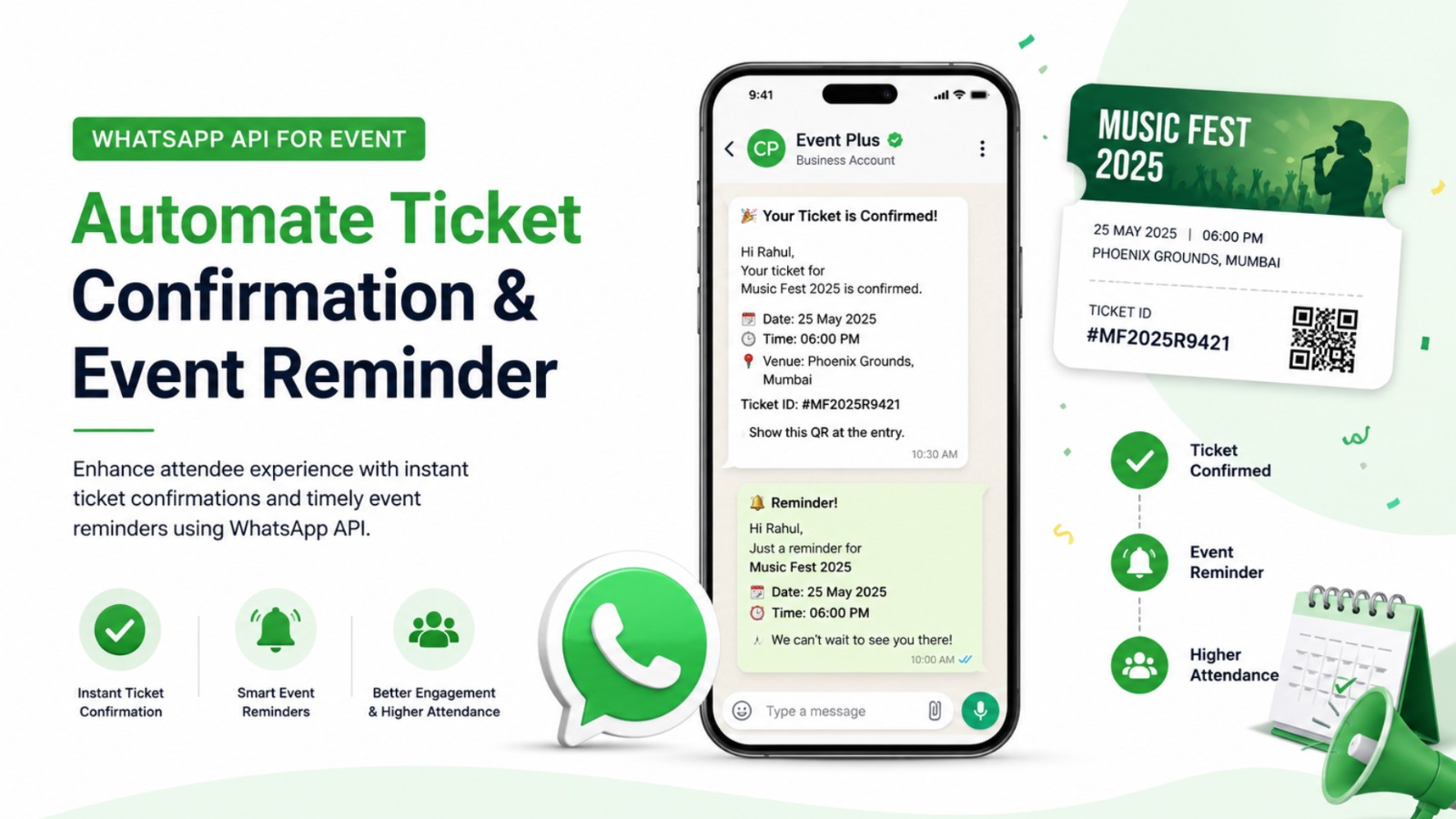
With the WhatsApp API for Events, businesses can send an automated confirmation immediately after a successful booking.
The message can include:
- Attendee name
- Event name
- Ticket number
- Booking ID
- Event date
- Event time
- Venue
- Number of tickets
- Payment status
- QR code or digital ticket
- Customer support option
Therefore, attendees receive all essential information in one place.
Example Ticket Confirmation Flow
The process can be simple:
Customer books ticket → Payment succeeds → Ticketing system updates → WhatsApp API triggers message → Customer receives confirmation
This automated workflow reduces delays and gives customers confidence that their booking has been completed successfully.
2. Send Automated Payment Confirmation
Ticket bookings often involve online payments.
However, customers may become concerned when money has been deducted but confirmation has not arrived.
With WhatsApp automation, businesses can instantly notify customers when payment is successfully processed.
For example, the message can confirm:
Payment Received → Booking Confirmed → Ticket Generated
Furthermore, businesses can include the booking reference and ticket details in the same conversation.
If a payment fails, an automated WhatsApp message can also guide the customer toward the next step.
As a result, businesses can reduce confusion and improve the overall booking experience.
3. Send Event Reminders Automatically
People are busy.
Even after purchasing a ticket, attendees can forget the event date or time.
That is why WhatsApp event reminders are extremely useful.
Instead of sending one reminder, businesses can create a complete reminder sequence.
For example:
7 Days Before the Event
Send an early reminder containing:
- Event name
- Date
- Venue
- Ticket details
- Important instructions
1 Day Before the Event
Send a more direct reminder with essential information.
A Few Hours Before the Event
Send a final reminder with the venue, entry instructions, and ticket details.
This approach keeps the event fresh in the attendee’s mind.
Additionally, businesses can reduce the chances of attendees missing the event.
4. Share Venue and Location Details
Finding the venue can sometimes be difficult, especially for large conferences, exhibitions, concerts, weddings, and corporate events.
Therefore, organizers should make location information easy to access.
With WhatsApp Business API, businesses can automatically send:
- Venue name
- Complete address
- Google Maps location
- Parking information
- Entry gate
- Hall or room number
- Check-in instructions
For example, a reminder can include a location link so attendees can quickly navigate to the venue.
This small improvement can create a much better event experience.
5. Automate Event Registration
Event registration is another area where automation can save significant time.
Instead of asking attendees to complete multiple manual steps, businesses can use WhatsApp chatbots to collect basic information.
For example, a chatbot can ask:
Which event would you like to attend?
Then:
How many tickets do you need?
Next:
Please share your name and email address.
After collecting the required details, the system can guide the customer toward payment or ticket confirmation.
Consequently, businesses can simplify registration while reducing repetitive work for their teams.
6. Use WhatsApp Chatbots for Event Enquiries
Attendees often have similar questions.
For example:
- What is the ticket price?
- Where is the event?
- What time does the event start?
- Is parking available?
- Can I transfer my ticket?
- Is food included?
- What is the cancellation policy?
- Can I get a refund?
- How do I access my ticket?
Answering the same questions repeatedly can consume valuable staff time.
A WhatsApp chatbot for events can handle many common queries automatically.
Moreover, customers can receive answers instantly instead of waiting for a support executive.
If the chatbot cannot answer a question, it can transfer the conversation to a human team member.
Therefore, businesses can combine automation with human support.
7. Send Real-Time Event Updates
Event plans can change.
For example, the venue may change, a speaker may be replaced, or the event schedule may be updated.
In such situations, communication speed matters.
A delayed update can cause confusion among attendees.
With WhatsApp API for Events, organizers can quickly notify registered attendees about important changes.
Messages can include:
- Schedule changes
- Venue changes
- Speaker updates
- Entry instructions
- Emergency announcements
- Event postponements
- Cancellation information
Because WhatsApp messages reach customers directly, organizers can communicate important information quickly.
8. Improve Attendee Engagement Before the Event
Event marketing should not stop after ticket sales.
Instead, organizers can continue engaging attendees before the event.
For example, businesses can send:
- Speaker introductions
- Event highlights
- Session previews
- Behind-the-scenes content
- FAQs
- Preparation tips
- Countdown messages
A simple countdown can build excitement.
For example:
7 Days to Go!
3 Days to Go!
Tomorrow!
See You Today!
These messages can create anticipation while keeping attendees connected with the event.
9. Automate Event Check-In
Event organizers can also use WhatsApp to simplify the check-in process.
For example, attendees can receive a digital ticket or QR code directly through WhatsApp.
At the venue, staff can scan the QR code and verify the attendee.
This can reduce paperwork and speed up entry.
Furthermore, businesses can use automated messages to provide last-minute instructions about check-in counters, entry gates, and seating areas.
Therefore, WhatsApp automation can improve both the pre-event and on-site experience.
10. Send Post-Event Follow-Ups
Communication should not end when the event finishes.
In fact, post-event communication can help businesses build long-term relationships with attendees.
After the event, organizers can send a thank-you message.
For example:
Thank you for attending our event!
The follow-up can also include:
- Feedback forms
- Event photos
- Presentation links
- Certificates
- Replay links
- Future event announcements
- Special offers
Additionally, businesses can ask attendees to rate their experience.
This feedback can help organizers understand what worked well and what needs improvement.
How WhatsApp API Creates an Automated Event Journey
A successful event communication strategy should cover the entire customer journey.
With the WhatsApp API for Events, businesses can build an automated flow like this:
Step 1: Customer Discovers the Event
The attendee discovers the event through:
- Google Ads
- Meta Ads
- Search engines
- Email marketing
- Influencer marketing
- Website traffic
Step 2: Customer Registers
The customer visits the event website or starts a WhatsApp conversation.
Step 3: Customer Books a Ticket
The customer selects the ticket and completes the payment.
Step 4: WhatsApp Sends Confirmation
The system automatically sends ticket confirmation.
Step 5: Reminder Sequence Begins
The attendee receives scheduled reminders before the event.
Step 6: Important Updates Are Shared
Venue, schedule, speaker, or entry updates are delivered automatically.
Step 7: Customer Attends the Event
The attendee uses the digital ticket or QR code for entry.
Step 8: Post-Event Follow-Up
The business sends a thank-you message and feedback request.
This creates a complete communication journey with minimal manual effort.
WhatsApp API for Events + Digital Marketing
Digital marketing attracts potential attendees.
However, communication helps convert and retain them.
This is why combining digital marketing with WhatsApp Business API for events can create a powerful strategy.
For example, an event organizer can run Meta Ads to generate registrations.
The customer clicks the advertisement and visits the landing page.
Next, the customer registers or starts a WhatsApp conversation.
After registration, WhatsApp automation takes over.
The attendee receives confirmation, reminders, event information, and follow-up messages.
Therefore, the journey can move from:
Ad → Registration → WhatsApp → Confirmation → Reminder → Attendance → Follow-Up
This approach connects marketing and customer communication.
For businesses working with Trending Bulb, the focus can be on creating a strong digital marketing strategy that attracts the right audience and then uses WhatsApp automation to improve communication and conversions.
Similarly, Step4Growth can help businesses build a growth-focused digital strategy where marketing campaigns and automated customer journeys work together.
How CampaignPlus Can Help With WhatsApp API Automation
For businesses looking to implement WhatsApp automation, Campaign Plus can be positioned as a WhatsApp API solution for managing automated business communication.
For event businesses, a WhatsApp automation strategy can support workflows such as:
Ticket Booking → Payment Confirmation → Ticket Delivery → Reminder → Event Update → Feedback
Instead of treating every message as a separate activity, businesses can build an automated communication journey.
This can help event organizers save time and maintain consistent customer communication.
Furthermore, businesses can combine WhatsApp automation with their existing marketing and customer management systems.
Benefits of WhatsApp API for Event Organizers
The biggest advantage of WhatsApp automation is not simply sending messages.
It is about creating a better communication system.
Here are some key benefits.
Faster Communication
Customers receive important information quickly.
Less Manual Work
Teams do not need to send repetitive messages individually.
Better Customer Experience
Attendees can access important information in one conversation.
Higher Engagement
Businesses can keep attendees engaged before and after the event.
Fewer Missed Events
Scheduled reminders can help attendees remember important dates.
Better Lead Management
Businesses can capture and organize event enquiries.
Scalable Communication
Automation can support communication with a large number of attendees.
Consistent Messaging
Every attendee can receive the correct information according to their booking status.
WhatsApp API vs Manual Event Communication
Manual communication may work for a small event.
However, it becomes difficult when the attendee database grows.
| Manual Communication | WhatsApp API Automation |
|---|---|
| Messages sent individually | Automated messages |
| High staff involvement | Reduced manual effort |
| Greater chance of delays | Faster communication |
| Difficult to scale | Designed for scalable communication |
| Repetitive tasks | Automated workflows |
| Limited personalization | Personalized messages |
| Manual reminders | Scheduled reminders |
Therefore, businesses organizing frequent or large-scale events can benefit from automation.
WhatsApp API for Different Types of Events
The WhatsApp API for Events is not limited to one type of event.
It can support communication for:
Conferences
Send registrations, speaker updates, schedules, and venue details.
Concerts
Send ticket confirmations, entry instructions, and event reminders.
Exhibitions
Share booth information, visitor registrations, and schedules.
Corporate Events
Send invitations, confirmations, agendas, and meeting details.
Webinars
Automate registration confirmations and joining reminders.
Workshops
Share preparation instructions, schedules, and certificates.
Sports Events
Send registration confirmations, match schedules, and venue updates.
Weddings and Private Events
Send invitations, confirmations, venue information, and reminders.
Thus, businesses across different event categories can use WhatsApp automation to improve attendee communication.
Best Practices for WhatsApp Event Automation
Automation works best when messages are useful and relevant.
Therefore, businesses should follow a few important practices.
Keep Messages Short
Customers should understand the main information quickly.
Personalize Communication
Use relevant customer and booking information where appropriate.
Send Timely Reminders
Avoid sending too many unnecessary messages.
Provide Important Information First
Put the event date, time, venue, and ticket details where customers can easily find them.
Use Clear Calls to Action
For example:
View Ticket
Get Directions
Contact Support
Complete Registration
Combine Automation With Human Support
Automation should handle repetitive questions, while complex requests can be transferred to a human agent.
Follow WhatsApp Business Messaging Rules
Businesses should use approved message templates and follow applicable WhatsApp Business policies when sending business-initiated communications.
Common Mistakes Businesses Should Avoid
Although WhatsApp automation offers many benefits, poor implementation can reduce its effectiveness.
One common mistake is sending too many messages.
Another is providing irrelevant information.
Similarly, businesses sometimes send reminders without including the actual ticket or venue details.
That forces customers to search through previous messages.
Instead, every important reminder should provide the information the attendee needs at that moment.
Businesses should also avoid making the chatbot unnecessarily complicated.
The goal should be simple communication.
The Future of Event Communication
Event management is becoming increasingly digital.
Customers now expect quick confirmations, easy ticket access, instant answers, and timely updates.
As a result, event organizers need communication systems that can keep up with these expectations.
WhatsApp is well suited to this environment because it can bring multiple stages of the customer journey into one communication channel.
From registration to ticket confirmation and from reminders to feedback, automation can support the complete attendee journey.
Moreover, businesses can combine WhatsApp automation with CRM systems, chatbots, payment systems, ticketing platforms, and digital marketing campaigns.
This creates a more connected event ecosystem.
Why Businesses Should Start Using WhatsApp API for Events
Running an event requires careful planning.
However, customer communication should not become another operational challenge.
With WhatsApp API for Events, businesses can automate repetitive communication while keeping attendees informed.
Ticket confirmations can be delivered instantly.
Payment updates can be automated.
Event reminders can be scheduled.
Venue information can be shared at the right time.
Chatbots can answer common questions.
Important event updates can reach attendees quickly.
Finally, post-event messages can help businesses collect feedback and promote future events.
Therefore, WhatsApp automation can turn event communication from a manual task into a structured customer journey.
Final Thoughts
Events are built around experiences.
However, that experience starts before attendees enter the venue.
It begins when they discover the event, register for a ticket, receive confirmation, and get their first reminder.
That is why communication plays such an important role in event success.
The WhatsApp API for Events gives businesses an opportunity to automate this communication journey while reducing repetitive work.
From automated event ticket confirmation and WhatsApp event reminders to chatbot support, venue updates, digital tickets, and post-event feedback, WhatsApp automation can support almost every stage of the attendee journey.
For businesses looking to connect digital marketing with automated customer communication, Trending Bulb can focus on attracting the right audience, while Step4Growth can support a growth-oriented marketing approach. Meanwhile, Campaign Plus can be used as the WhatsApp API solution layer for building automated communication workflows.
Ultimately, the goal is simple:
Attract attendees. Confirm their tickets. Keep them informed. Remind them at the right time. Deliver a better event experience.
And with the right automation strategy, businesses can do all of this without manually managing every conversation.